You are currently viewing documentation for CompuTec ProcessForce 3.0, which is a plugin installed and managed through CompuTec AppEngine 3.0, built on .NET 8. If you are working with older environments, you may need the documentation for CompuTec ProcessForce 2.0: https://learn.computec.one/docs/processforce/2.0/.
Please note that CompuTec ProcessForce 2.0 will be supported only until December 31, 2026. After this date, the product will no longer receive regular support or maintenance updates. Read more
CompuTec AppEngine 3.0 introduces a new architecture, and all CompuTec components, including the CompuTec ProcessForce 3.0 plugin, must be updated together to ensure full compatibility.
Before starting your installation or upgrade process, we strongly recommend reviewing the CompuTec AppEngine 3.0 and CompuTec ProcessForce 3.0 documentation.
Costed Manufacturing Order Report
The Costed Manufacturing Order report allows you to review and compare Planned and Actual quantities and costs for materials and resources used in production.
It provides full transparency into:
- What the production was expected to cost
- What it actually cost
- The variance between planned and actual values
This report is useful for production cost control, variance analysis, and financial reconciliation.
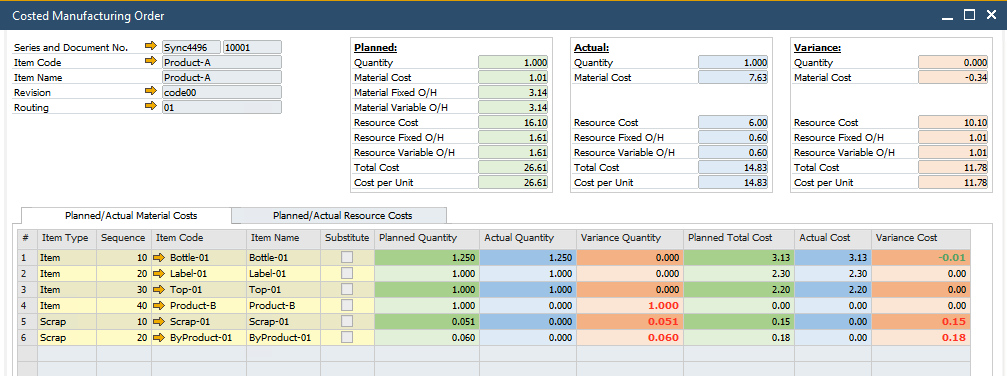
Planned Costs
Planned Costs are retrieved at the time the Manufacturing Order is created.
They are sourced:
- From Item Costing
- From Resource Costing
- Using Standard Cost category 000
At creation time, the system copies these costs into Item and Resource lines.
This ensures that the Manufacturing Order stores a snapshot of the expected cost at the time of planning.
Refresh Planned Costs
If standard costs change after the order is created, you can update the planned values.
To refresh planned costs:
- Right-click inside the Manufacturing Order.
- Select Refresh Planned Costs.
This updates the planned values based on the current standard cost.
Actual Costs
Actual Costs reflect what truly happened during production. The system collects them from different sources depending on item type.
Inventory Items
For inventory-managed items, actual costs are taken from:
- Goods Issue documents
- Goods Receipt documents
The cost is derived directly from the inventory transactions posted to the Manufacturing Order.
Non-Inventory Items
For non-inventory items, the actual costs are recorded directly in Journal Entry lines linked to the order.
Resources
For resources (labor, machine time, etc.), actual costs come from:
- Time Booking documents
- The most recent Time Correction document (if applicable)
These postings determine the final actual resource cost of the order.
Technical details
Report uses SQL functions to collect details for planned and actual costs.
Material Cost Function
This function collects planned and actual cost data for materials.
CT_PF_MaterialCostFunctionForCostedMor
Example for Manufacturing Order with DocEntry = 123:
SELECT * FROM "CT_PF_MaterialCostFunctionForCostedMor"(123);
If you want to retrieve data for all Manufacturing Orders:
SELECT * FROM "CT_PF_MaterialCostFunctionForCostedMor"(-1);
Resource Cost Function
This function collects planned and actual cost data for resources.
CT_PF_ResourceCostFunctionForCostedMor
Example for Manufacturing Order with DocEntry = 123:
SELECT * FROM "CT_PF_ResourceCostFunctionForCostedMor"(123);
Example for all oders:
SELECT * FROM "CT_PF_ResourceCostFunctionForCostedMor"(-1);
Manufacturing Order Transactions View
All actual transaction costs related to Manufacturing Orders can also be reviewed in the database view:
CT_PF_MOR_Transactions
This view contains the detailed transactional postings that build up the actual cost values. It can be useful for reconciliation, toubleshooting cost discrepancies, audit purposes, or advanced reporting.