You are currently viewing documentation for CompuTec AppEngine 3.0 (.NET 8).
If you are working with older environments, you may need the documentation for CompuTec AppEngine 2.0 based on .NET Framework: https://learn.computec.one/docs/appengine/2.0/.
Please note that CompuTec AppEngine 2.0 will be supported only until December 31, 2026. After this date, the product will no longer receive regular support or maintenance updates. Read more
As CompuTec AppEngine 3.0 introduces a new architecture, all CompuTec components must be updated together to ensure full compatibility.
Please review the CompuTec AppEngine 3.0 documentation before starting your installation or upgrade process.
CompuTec AE Tools for Visual Studio Code
CompuTec AE Tools is a Visual Studio Code extension that scaffolds the parts of CompuTec AppEngine plugin development that are otherwise written by hand: SAP Business One Web Client UI API extensions and UI5 dialogs.
Instead of copying a skeleton project from an existing plugin and adjusting identifiers by
hand, you right-click a file in the Explorer and answer a few prompts. The extension creates
the project structure and keeps the configuration files that describe it — manifest.json,
mta.yaml, app.json, launch.json and the plugin .csproj — in sync with each other.
Installation
Open the Extensions view in Visual Studio Code (Ctrl+Shift+X), search for
CompuTec AE Tools, and select Install.
The extension can also be installed from a .vsix file, which is how pre-release builds are
distributed inside CompuTec:
code --install-extension computec-ae-tools-<version>.vsix
Alternatively, in Visual Studio Code: Extensions view → the … menu → Install from VSIX….
Requirements
- A CompuTec AppEngine plugin workspace. The commands are driven by the files they act on —
the plugin's
manifest.jsonand the UI API extension'smta.yaml. - Node.js and npm on
PATH, used to build the generated UI API extension projects. - The .NET SDK on
PATHfor the dialog scaffolder. TheCompuTec.AppEngine.Templatespackage is installed on demand — when you add a dialog and the template is missing, the extension offers to install it from nuget.org, and suggests an update when a newer version is available.
Commands
All three commands live in the Explorer context menu and appear only on the file or folder they apply to.
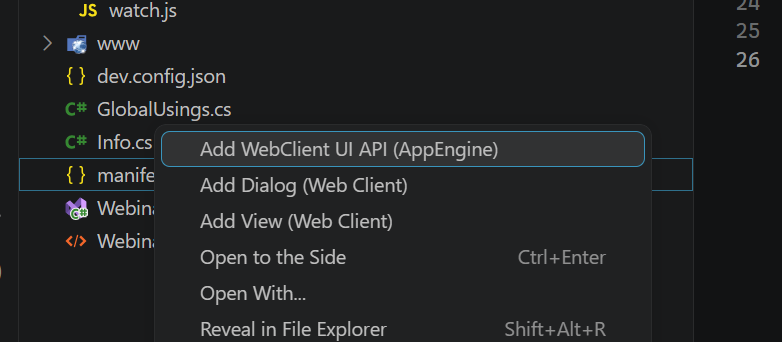
| Command | Where | What it does |
|---|---|---|
| Add WebClient UI API (AppEngine) | right-click a plugin's manifest.json | Scaffolds a complete UI API extension project — gulp build, mta.yaml, .vscode configuration — and registers it in the plugin |
| Add WebClient View to UI API (AppEngine) | right-click mta.yaml | Adds a view module (controller, layout, i18n, models) to an existing UI API extension and updates every configuration file that has to know about it |
| Add Dialog to App (AppEngine) | right-click a folder | Generates a UI5 dialog scaffold from the CompuTec.AppEngine.Templates dotnet template into that folder |
Creating a UI API extension
- Open your AppEngine plugin workspace in Visual Studio Code.
- Right-click the plugin's
manifest.jsonand select Add WebClient UI API (AppEngine). - Answer the prompts — the extension name and the target business object view.
- Right-click the generated
mta.yamland select Add WebClient View to UI API (AppEngine) to add further views.
View scaffolding includes a picker for the known SAP Business One Web Client business object view IDs — Sales Order, Business Partner and others — so a new extension binds to the correct Fiori elements view without looking the identifier up.
Adding a UI5 dialog
Right-click a folder inside your plugin's UI5 application and select Add Dialog to App (AppEngine). The dialog is generated into that folder from the dotnet template package. If the template is not installed, accept the install prompt — the dialog is generated once the installation finishes.
Related topics
- CompuTec Tool — the
dotnet ctcommand-line utility for models, packaging and translations. - Plugin Development Configuration — the
dev.config.jsonfile the AppEngine host reads when loading a plugin for debugging.
License and third-party notices
CompuTec AE Tools is released under the Apache License 2.0.
The UI API project templates bundled with the extension are derived from SAP's
@sap/generator-businessone-webclient-extension (© SAP SE, Apache License 2.0) and were
modified by CompuTec. The extension ships a NOTICE file with the full attribution.
SAP and SAP Business One are trademarks of SAP SE. CompuTec AE Tools is an independent CompuTec product and is not endorsed by or affiliated with SAP.