You are currently viewing documentation for CompuTec ProcessForce 3.0, which is a plugin installed and managed through CompuTec AppEngine 3.0, built on .NET 8. If you are working with older environments, you may need the documentation for CompuTec ProcessForce 2.0: https://learn.computec.one/docs/processforce/2.0/.
Please note that CompuTec ProcessForce 2.0 will be supported only until December 31, 2026. After this date, the product will no longer receive regular support or maintenance updates. Read more
CompuTec AppEngine 3.0 introduces a new architecture, and all CompuTec components, including the CompuTec ProcessForce 3.0 plugin, must be updated together to ensure full compatibility.
Before starting your installation or upgrade process, we strongly recommend reviewing the CompuTec AppEngine 3.0 and CompuTec ProcessForce 3.0 documentation.
Multistructure Fixed and Variable Overhead Costs
The Multistructure Fixed and Variable Overhead Costs feature in CompuTec ProcessForce allows businesses to define structured overhead cost types - both fixed and variable - enabling more granular cost allocations. This setup improves the clarity and accuracy of cost calculations by allowing users to organize and apply different overhead structures across items and resources.
By using this functionality, organizations can:
- Enhance accuracy in cost roll-ups
- Gain better visibility into overhead distribution
- Simplify maintenance of cost structures for improved decision-making
Settings
General Settings
To access Costing, navigate to:
Administration → System Initialization → General Settings → ProcessForce tab → Inventory tab → Costing
Check the box for Multistructure Fixed and Variable Overhead Costs
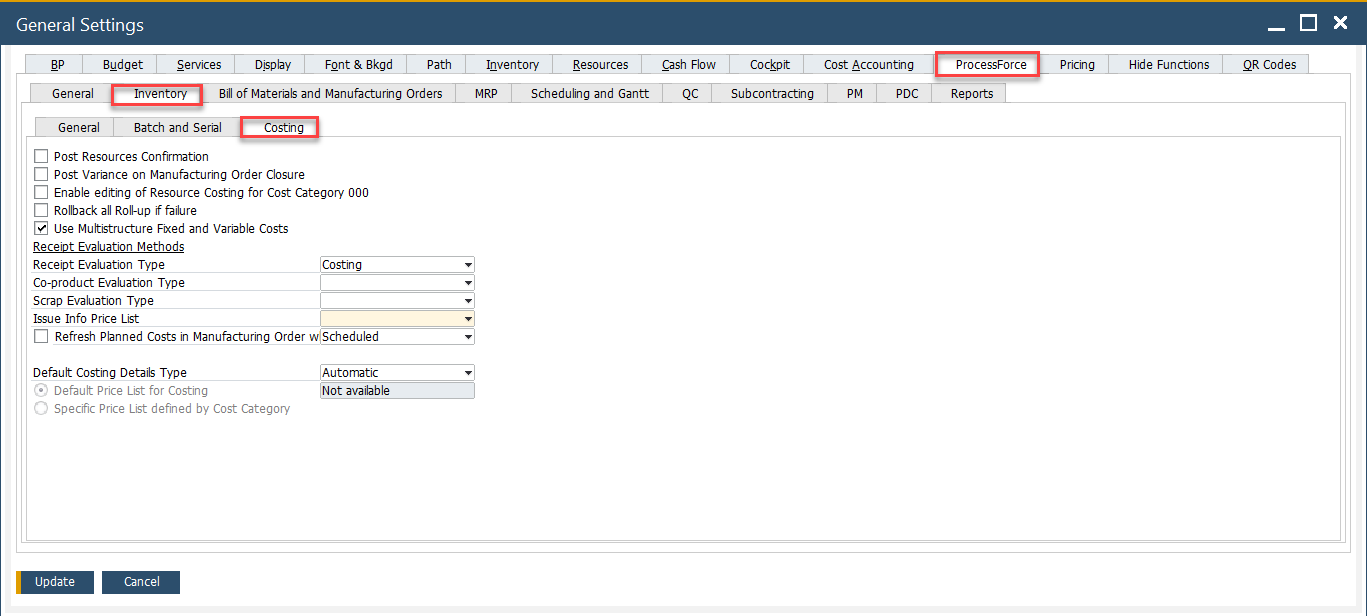
Overhead Types Definition
To access Overhead Types, navigate to:
Administration → Setup → Financials → Overhead Types
In this form, you can create and manage cost types, which can later be applied in both the Item Costing and Resource Costing forms. The following parameters can be configured:
-
Code
-
Name
-
Type: Fixed or Variable

Usage of the Option
Once defined, the overhead types can be used within the Item Costing and Resource Costing forms. To access these forms, navigate to:
Costing → Item Costing
Predefined Overhead Types can be used on the Costing Details tab on the Item Costing form and on Resource Costing in the following columns:
-
Fixed O/H
-
Fixed O/H %
-
Fixed O/H Other
-
Variable O/H
-
Variable O/H %
-
Variable O/H Other
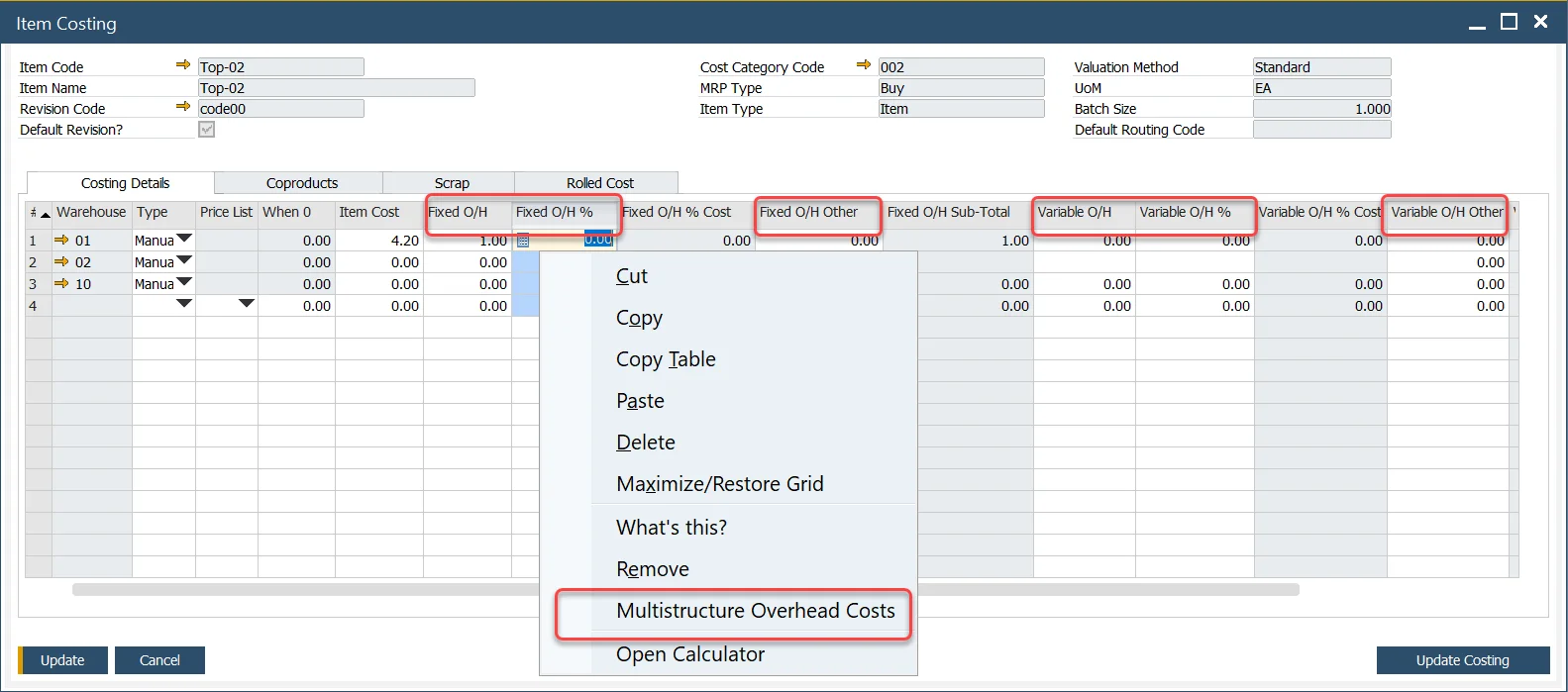
Please note that this option is applicable to all cost categories except for the 000 category. However, any changes made to other cost categories can be transferred to the 000 category using the rroll-over procedure.
Once the option is selected, you can choose the relevant cost types and assign values to them.
Note: Only cost types marked as "Fixed" can be selected for fixed cost entries.
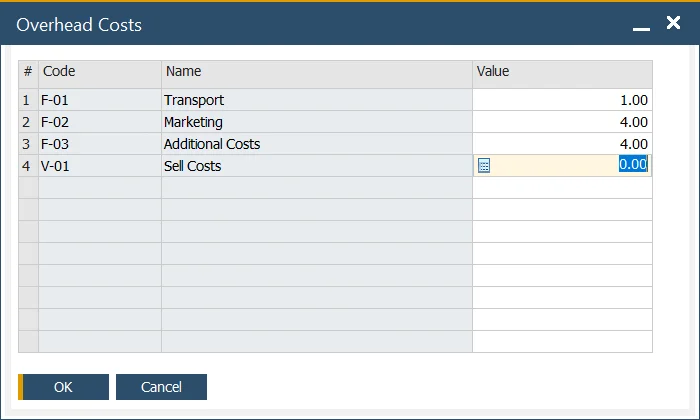
After clicking the "OK" button, the total cost will be automatically populated in the corresponding grid:
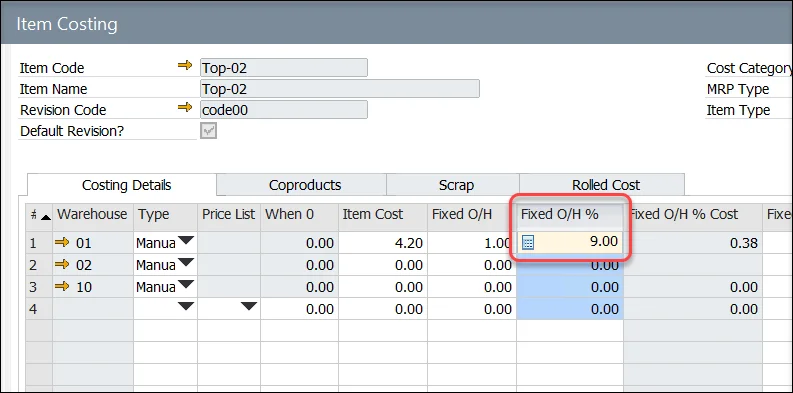
When you reopen the Multistructure Overhead Costs option, any previously saved costs and their values will be displayed, allowing you to review and modify them as needed.