You are currently viewing documentation for CompuTec ProcessForce 3.0, which is a plugin installed and managed through CompuTec AppEngine 3.0, built on .NET 8. If you are working with older environments, you may need the documentation for CompuTec ProcessForce 2.0: https://learn.computec.one/docs/processforce/2.0/.
Please note that CompuTec ProcessForce 2.0 will be supported only until December 31, 2026. After this date, the product will no longer receive regular support or maintenance updates. Read more
CompuTec AppEngine 3.0 introduces a new architecture, and all CompuTec components, including the CompuTec ProcessForce 3.0 plugin, must be updated together to ensure full compatibility.
Before starting your installation or upgrade process, we strongly recommend reviewing the CompuTec AppEngine 3.0 and CompuTec ProcessForce 3.0 documentation.
Teams
The Teams feature in SAP Business One allows users to create and manage groups of employees working together on manufacturing tasks. By defining teams and assigning a Team Leader, businesses can enhance production efficiency, streamline time tracking, and improve workforce coordination.
To set up a team, navigate to:
Production → Time Booking → Teams
To create and manage teams:
-
Open the Teams function.
-
Select employees from the List of Employees to form a team.
-
Assign a Team Leader to oversee and manage the team.
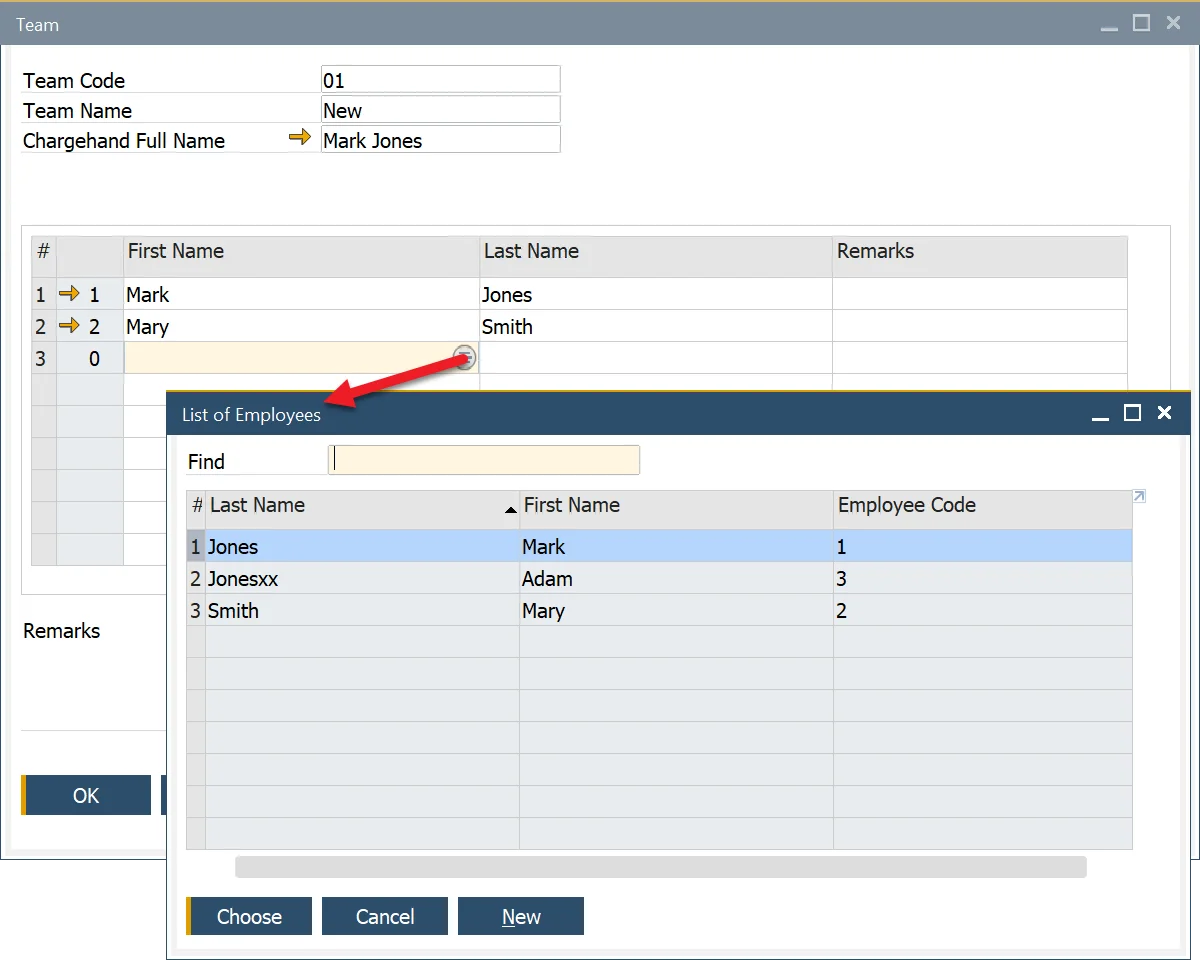
New employees can be added using the SAP Business One Employee Master Data function: Main Menu → Human Resources → Employee Master Data